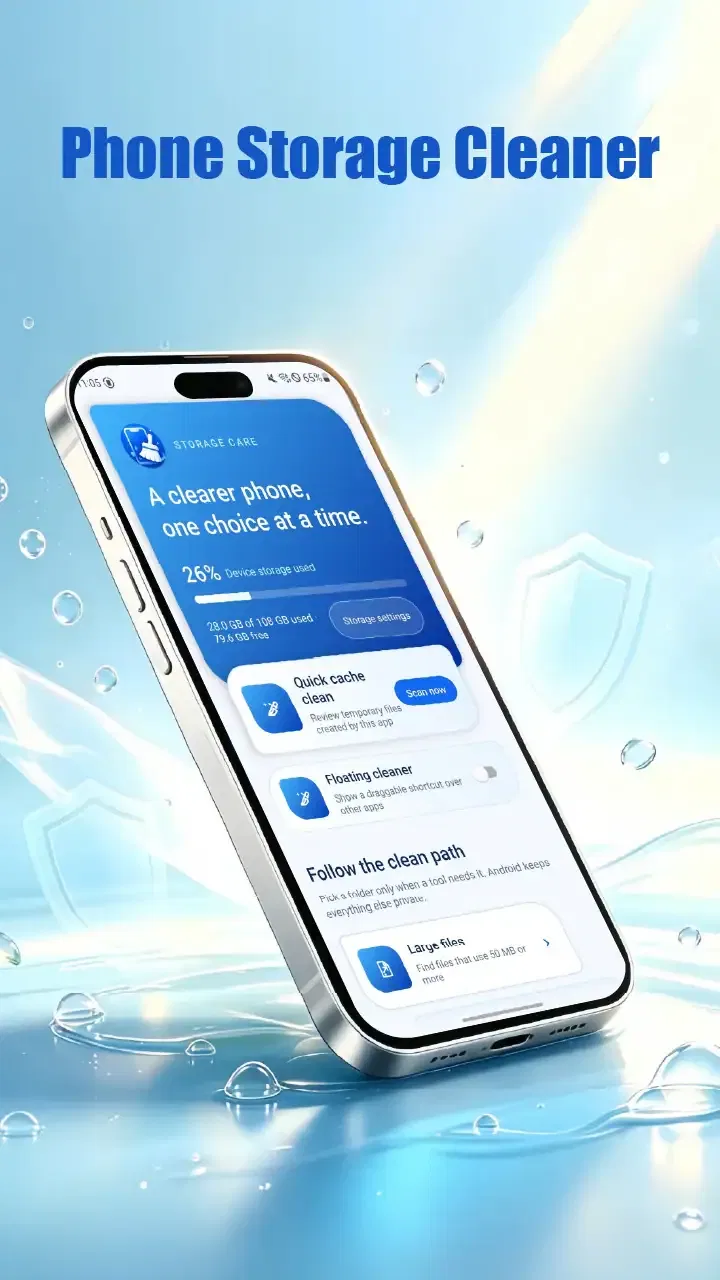
Phone Storage Cleaner
- 3.8
- Rating
- 50.00K
- Installs
- Free
- Price

 Analysis by App-foxy
When a phone is shared around a household, storage problems rarely belong to one person. One family member saves photos, another downloads videos, and someone else keeps messaging attachments without noticing how quickly they accumulate. Phone Storage Cleaner is a small tools app from Hongwenyue that focuses on one practical job: helping clean up space on an Android phone. I found its appeal less in flashy extras and more in the simple question it addresses: what can I remove safely before the phone starts complaining about low storage?
The app is free, carries an Everyone age rating, and is aimed at Android devices running version 10 or later. Its current version is 1.0.2, so I approached it as a straightforward utility rather than a mature all-in-one maintenance suite. That distinction matters. If you want a storage screen that helps you make decisions, it may be useful. If you expect automatic optimization, deep device management, or family administration tools, you should keep your expectations narrower.
How it fits a shared household phone
A realistic use case is a phone used by several people during a busy week. A parent takes pictures, a child downloads clips or games, and another household member saves documents from a chat. The phone still works, but new photos fail to save or an update cannot install. In that situation, a cleaner is most useful as a pause button: open it, inspect what is taking space, and decide what is genuinely disposable.
You May Also Like

 Blood Strike: 2.5 Anniversary
Blood Strike’s Loadouts Turn Every Drop Into a Tactical Gamble
A close look at Blood Strike’s custom loadouts: how fast access to signature weapons reshapes its battle royale rhythm, rewards preparation, and narrows the gap between fights.

 Pandora - Music & Podcasts
Pandora’s Music Is Easy to Start, but Harder to Recover
Pandora’s strength is its low-effort path from a seed to a station. Its weak spot is how much confidence it asks you to place in connection, setup, and quiet recovery.

 8 Ball Pool
 Is Built on Rivalries, Rematches, and Routine
A close look at the rivalries, rematches, shared routines, and unanswered safety questions that turn a quick pool match into a persistent mobile community.

 Samsung Music
’s Quiet Strength Is Playing What You Already Own
Its reach comes less from spectacle than from dependable access to a personal library. That simplicity is both the app’s strongest retention engine and its ceiling.

 AccuWeather: Weather Radar
AccuWeather Review: A Quick, Clear Forecast for Everyday Decisions
For everyday plans, the best forecast is the one you can understand quickly. AccuWeather makes rain timing, radar, and local conditions easy to act on, with a few trade-offs.

 Hill Climb Racing
Why Hill Climb Racing Still Turns Crashes Into One More Run
A tiny car, a bumpy hill and one more upgrade: Hill Climb Racing keeps resurfacing because its simple chaos makes every near-miss feel personal.
More From Our News Desk
View All News


I would not hand the app to a child and say, “clean everything.” Storage cleanup is not just a technical task. A large video may look unnecessary but could be a school project, a family recording, or an important offline file. The better household routine is to let one person review the results while asking the others whether anything belongs to them. That small conversation prevents the most common mistake with cleanup tools: treating size as proof that a file has no value.
For a shared device, the strongest benefit is visibility. Instead of opening several unrelated folders and guessing which downloads are old, I can use the app as a starting point for a storage review. The practical workflow is simple: check what is consuming space, identify items associated with a particular person or activity, and only then remove what everyone agrees is no longer needed.
The safest habit is to review first and delete second. This is especially important when a phone has no clear separation between household members. A cleaner can help expose clutter, but it cannot know the emotional or practical value of a file just because that file is large.
Keeping personal boundaries clear
Phone Storage Cleaner should not be confused with a family account manager or a profile-separation system. Its purpose is storage maintenance, not deciding who may access which content. On a shared phone, that means the person using it should already have permission to inspect and remove files. I would avoid running a cleanup session while another household member is still relying on the phone for work, travel, school, or communication.
This boundary also changes how I would use it with an older relative. Rather than taking over the phone and deleting items on their behalf, I would sit beside them and explain each category in ordinary language. The app can be part of a guided cleanup, but the owner should remain involved in the decision. That approach is slower than tapping through a bulk action, yet it is much less likely to remove something important.
There is another useful boundary: separate temporary clutter from personal archives. A crowded downloads area may contain duplicate documents, old installation files, or media that has already been copied elsewhere, but it may also contain receipts and travel information. I would first create a small “keep” group outside the cleanup process, then return to the remaining material. This is a more deliberate workflow than trusting a single cleanup suggestion.
People often ask whether a storage cleaner replaces the phone’s built-in storage screen. In my experience, it is better viewed as an alternative way to begin the same conversation, not a guaranteed replacement for system tools. The built-in settings remain the right place when I need to understand system-level storage, app usage, or device-specific controls. Phone Storage Cleaner is more attractive when I want a focused utility rather than a tour through several settings pages.
Coordinating cleanup without arguments
Household cleanup works best when it is scheduled around ownership. I would ask each person to review their own photos, downloads, and large media before the final deletion step. If the phone is used by a couple, one person can identify the files while the other confirms what can go. If children use the device, an adult should make the final decision, especially when the child may not recognize the difference between a disposable download and a saved memory.
A useful trick is to clean in small rounds instead of trying to empty the phone in one session. Start with obvious clutter such as abandoned downloads or duplicate-looking media, then use the phone normally for a while. If nobody notices a missing file, continue later. This staged approach is valuable because storage cleanup is reversible only when you have a backup or another copy; a rushed session can turn a minor space problem into a household dispute.
I also prefer to record why a large group of files was kept. For example, if a family is preparing for a trip, offline maps, tickets, and downloaded entertainment may temporarily occupy a lot of space. That does not make them clutter. A quick note or shared understanding helps prevent the same files from being deleted during the next review simply because their purpose is not obvious.
The app’s rating sits at 3.8 from around thirty-five ratings, with about five written reviews, and it has passed fifty thousand installs. Those figures suggest that people are trying it for a modest, specific need rather than treating it as an established household management platform. I would interpret that as a reason to test it carefully on your own phone, not as proof that every cleanup result will suit a shared-device routine.
Age, trust, and everyday use
The Everyone rating makes the app broadly suitable from an age-classification perspective, but that does not mean every cleanup decision is appropriate for every age group. A young user can understand that the phone needs more space, yet may not understand the consequences of deleting cached or downloaded material. In a household, supervision should be based on responsibility and file ownership, not just the age label.
For teenagers, I would use the app as a teaching tool. Ask them to identify which files belong to school, hobbies, friends, or entertainment, and to explain why a file can be large without being useless. This turns a vague storage warning into a practical lesson about digital organization. It also avoids the feeling that an adult has silently inspected and removed personal material.
For older adults, the main advantage is the focused purpose. A storage utility can be easier to discuss than a long list of technical settings, provided the cleanup screen is understandable on the particular phone. I would still stay nearby during the first session, because unfamiliar labels can make a safe item look disposable. Trust comes from showing what will happen before confirming it, not from assuming that a cleaner knows the user’s priorities.
Privacy is another reason to keep expectations realistic. A storage tool deals with personal material, so I would only use it on a phone where I am comfortable granting the app the access required by its Android setup. I would read the permission prompts rather than approving them automatically, and I would avoid installing it on a device containing sensitive work or family records unless the owner is comfortable with the arrangement. The app’s purpose is useful, but convenience should not override basic access awareness.
One question many users have is whether a cleaner can make a slow phone feel new again. I would not count on that. Freeing space can help when storage is nearly full, but it does not automatically solve an aging battery, heavy background activity, or an app that is poorly behaved. Phone Storage Cleaner is best used for a storage shortage, not as a universal diagnosis for every performance problem.
Where it beats ordinary alternatives
The usual alternative is to open Android settings, inspect storage categories, and manage files through the phone’s file manager. Those options are often more authoritative because they are built into the operating system. They are also familiar once you know where everything is. For a technically confident user who wants precise control, the system tools may remain the better choice.
Phone Storage Cleaner has a different appeal: it gives the cleanup task its own place. I can approach it with one goal instead of wandering through settings, storage menus, gallery folders, and downloads. That focus is particularly helpful for a shared phone where the problem is not advanced diagnosis but getting several people to review clutter together.
Compared with broad “phone booster” apps, I prefer this narrower identity. A tool that concentrates on storage is easier to evaluate than one that promises to speed up everything, cool the phone, manage memory, and protect privacy at the same time. The trade-off is that a focused cleaner may feel limited if you want a complete maintenance dashboard. I would choose the simpler route when storage is the actual problem, and the built-in system tools when I need deeper control.
Cloud backup is another alternative, but it solves a different part of the problem. Moving photos or documents elsewhere can preserve them while reducing local usage, whereas a cleaner helps identify material that may no longer be needed. I would never treat cleanup as a substitute for backup. For irreplaceable family pictures, the sensible sequence is to confirm another copy exists, then consider removing the local version.
Practical limits before you install
The most important limitation is human judgment. No storage app can understand household ownership, sentimental value, school deadlines, or whether a downloaded document is still needed. If your phone contains years of mixed personal and shared material, the review may take longer than expected because every large item needs context. That is not a failure unique to this app; it is the unavoidable cost of cleaning a device responsibly.
I would also skip it if you are looking for automatic deletion with no decisions. That approach may sound convenient, but it is a poor match for a shared device. Likewise, users who need account boundaries, child-specific restrictions, or separate private spaces should look for operating-system features or dedicated family tools instead. Storage cleanup and family management are related only because both involve a phone used by more than one person.
Another trade-off is the app’s relatively small review history. With an average of 3.8, I would treat the experience as something to assess on my own device rather than assume it will behave identically across every Android phone. The current release is 1.0.2, which reinforces my preference for a cautious first session: review a small amount, keep important material backed up, and make sure the cleanup results match what the screen appears to promise.
The free price makes that trial easier. I can test whether the workflow suits a household without committing money, but “free” should not change the standard I apply to privacy or deletion decisions. I would still inspect prompts, avoid rushing through confirmations, and keep the app’s role limited to the storage problem it is designed to address.
My household verdict
I see Phone Storage Cleaner as a practical, focused utility for Android users who need help starting a storage cleanup. Its best setting is a household phone where several people contribute clutter and one responsible person coordinates a careful review. The app can make the problem more visible and reduce the friction of finding what deserves attention, especially when the alternative is searching through unrelated menus.
I would recommend it to someone who wants a free storage tool and is willing to remain involved in the deletion process. I would not recommend treating it as an automatic caretaker, a privacy boundary, a backup service, or a complete performance optimizer. Those expectations go beyond its role and create unnecessary risk on a shared device.
My preferred routine is simple: discuss whose files are on the phone, check for backups, review the largest or least useful items in small batches, and leave anything uncertain for later. Used that way, the app is a reasonable addition to a household maintenance routine. Used carelessly, it becomes just another shortcut that asks the user to trade judgment for speed. For this particular tool, the careful approach is not extra work; it is the feature that makes the cleanup worthwhile.
FAQs for Phone Storage Cleaner
01What features does Phone Storage Cleaner offer to help manage my device's storage?
Phone Storage Cleaner provides a suite of tools designed to optimize your device's storage. It includes features like junk file removal, cache cleaning, duplicate file detection, and large file management. These tools work together to ensure your device runs smoothly by freeing up valuable space and improving overall performance.
02Is Phone Storage Cleaner safe to use on my device?
Yes, Phone Storage Cleaner is designed with user safety in mind. It uses advanced algorithms to identify and clean unnecessary files without affecting important data. Additionally, it requests necessary permissions only and ensures that user privacy is respected throughout the cleaning process. Regular updates enhance its safety features.
03How often should I use Phone Storage Cleaner to maintain my device's performance?
For optimal performance, it's recommended to use Phone Storage Cleaner at least once a week. Regular cleaning helps prevent the buildup of unnecessary files and ensures that your device runs efficiently. However, the frequency can be adjusted based on personal usage patterns and the amount of data generated on your device.
04Does Phone Storage Cleaner affect the performance of other apps on my device?
Phone Storage Cleaner is designed to enhance, not hinder, the performance of your device. By removing junk files and clearing cache, it can actually improve the speed and responsiveness of other apps. It operates efficiently in the background, ensuring that it doesn’t interfere with your regular app usage.
05Is there a cost associated with using Phone Storage Cleaner?
Phone Storage Cleaner is available as a free download with basic features accessible to all users. However, it may offer premium features through in-app purchases or a subscription model. These premium options often include advanced tools and ad-free usage, providing a more comprehensive cleaning experience.
Pros
- Easy-to-use interface for quick cleaning.
- Significant boost in device performance.
- Customizable cleaning options.
- Real-time monitoring of storage usage.
- Supports multiple file formats for cleanup.
Cons
- Ads can be intrusive during use.
- Limited features in the free version.
- Occasional false positives in file detection.
- Requires permissions that may concern privacy.
- Some features need manual activation.

Phone Storage Cleaner
Gallery